A few months ago we started the boys on pocket money. They’re 6 and 8, and it felt like the right time to begin some kind of financial education: earning a bit, saving a bit, and learning that the things you want are worth waiting for.
Each of them now has a Monzo card and a savings pot, and that part works well. The part that didn’t work was seeing it. Neither of them has a phone (and won’t for a while yet), so the only place their money existed was an app on mine. If they wanted to know how close they were to the next Switch game, they had to come and ask me. It didn’t feel much like their money.
So I built them a piggy bank: a small e-ink screen with a single button that they can click through to see their balance and how they’re getting on with their savings goal. Here’s how our pocket money works and how the piggy bank came together, in case you fancy making one.
How our pocket money works
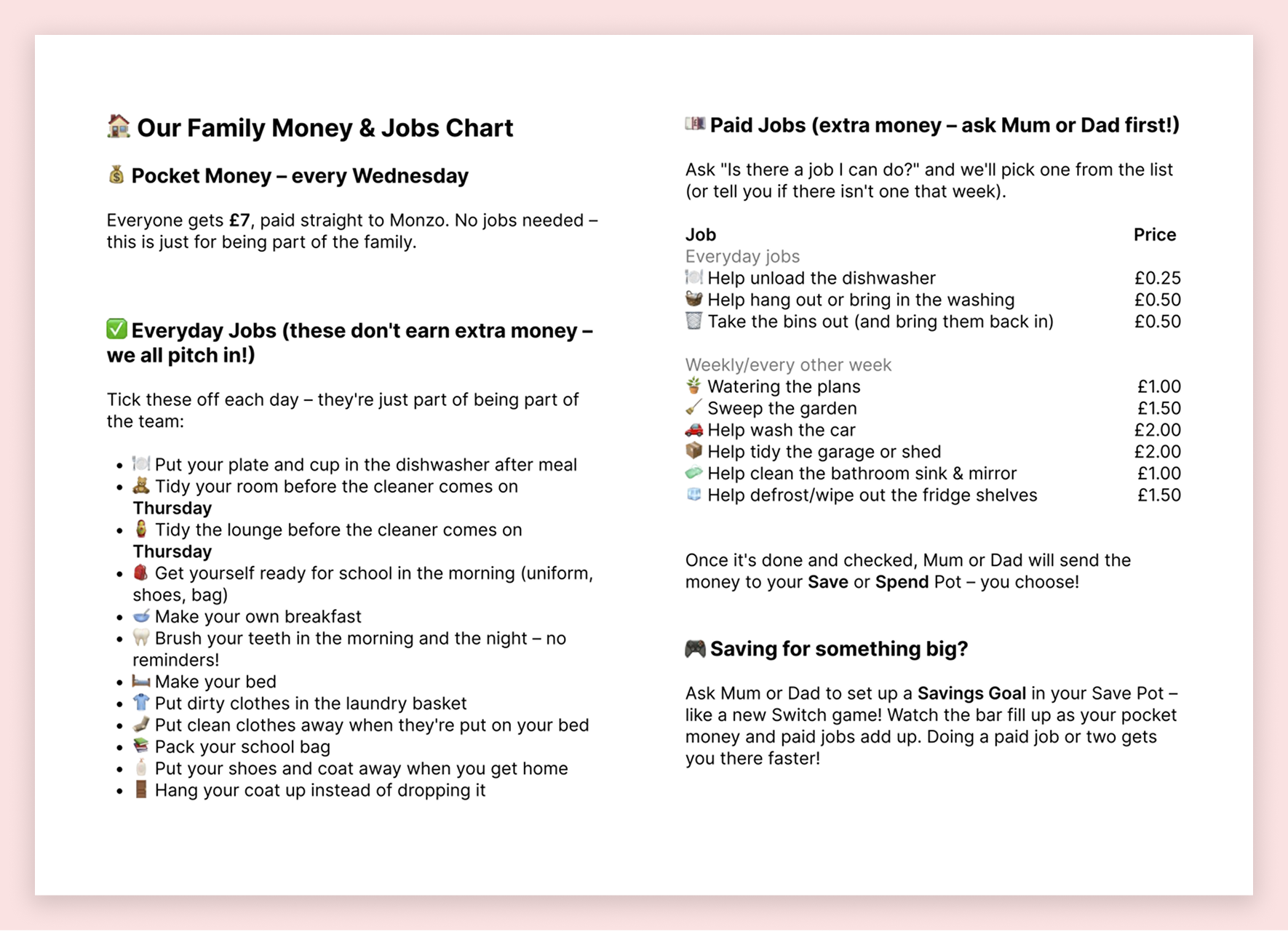
The basics are simple. The boys get £7 each, every Wednesday, paid straight into their Monzo accounts. There are no strings attached. It isn’t a wage. It comes with being part of the family.
The more interesting bit is the split between everyday jobs and paid jobs.
Everyday jobs are unpaid. If we paid the boys to make their beds, we’d be teaching them that helping out is optional unless there’s money involved. So they empty the dishwasher, tidy their rooms and get ready for school for free, the same way we do our jobs around the house without anyone paying us.
Paid jobs are separate. They’re bigger, optional tasks that take real extra effort, like sweeping the garden or washing the car. That teaches a different lesson: more work means more money, which is roughly how the real world works. It’s capped at one paid job a week each, so it doesn’t turn into a free-for-all or start replacing the everyday jobs.
Then there’s saving. We use Monzo Pots because a pot gives you a goal you can watch fill up (at the moment, both boys are saving for Switch games). At 6 and 8, that’s far more motivating than being told “well done, you saved some money”. They decide when to move money from Spend into Save, so saving is something they choose to do rather than something we impose.
The money itself is the least important part. What we’re really after is three ideas they can pick up early: you contribute to a family for free, you can earn extra by doing more, and saving towards something you want feels good. They’re gentle lessons at this age, but they compound (pun intended) as the boys get older and the numbers get bigger.
I’ve put the whole system into a [one-page] PDF, which you’re welcome to download and adapt for your own family.
📎 Download: our pocket money framework (PDF)
The problem with Pots
Which brings me back to the gap. The whole point of a pot is watching it fill up, and the boys couldn’t see theirs without borrowing my phone. A savings goal you can’t see doesn’t do much motivating. They needed something they could pick up and check for themselves.
Sourcing the device
I wanted something cheap and low-stakes to experiment with, so I wouldn’t mind if the first version was a bit rough. I went for a Waveshare ESP32-S3 with a 1.54” e-paper display, which cost under £15 from from Waveshare (you’ll want the one with the battery). It’s a tiny board with a 200px × 200px black-and-white screen, Wi-Fi and a button built in, which is pretty much everything this project needed.
E-paper suits this kind of thing well. It keeps showing an image without using any power, it looks more like printed paper than a screen, and it doesn’t glow, which matters when it lives in a bedroom.
Programming it
I’ve worked on IoT projects in the past, but never coded one myself. I broke the work into small steps and got each one working on the device before starting the next:
Get some test text onto the screen.
Read the button and flip between placeholder pages.
Connect to Wi-Fi.
Fetch the data and fill in the pages.
The board fetches a simple CSV file from a URL, so I can change where the data comes from without touching the rest of the code - connecting directly to Monzo would have been over engineering at this stage. Each bit of code does one job, so when it came to designing the screens, only the part that draws them needed to change.
E-paper has one quirk worth knowing about: it “ghosts”, leaving a faint trace of the previous image behind. The fix is a quick partial refresh each time the button is pressed, plus an occasional full refresh to clean the screen.
Designing the screens in Claude Design
200px × 200px in black and white doesn’t leave much room, so each screen does one job. There are two everyday screens and one that only turns up once a week:
Balance: what I’ve got.
Goal: what I’m saving for, and how close I am.
Pocket money day: this one only appears on Wednesdays, when the £7 lands.
The design process was simple. I exported the details of the screens from my Claude Code session, told Claude Design the canvas was 200×200, and asked for three routes. I picked my favourite parts of each, exported them, and fed the result back into Claude Code to build.
The result
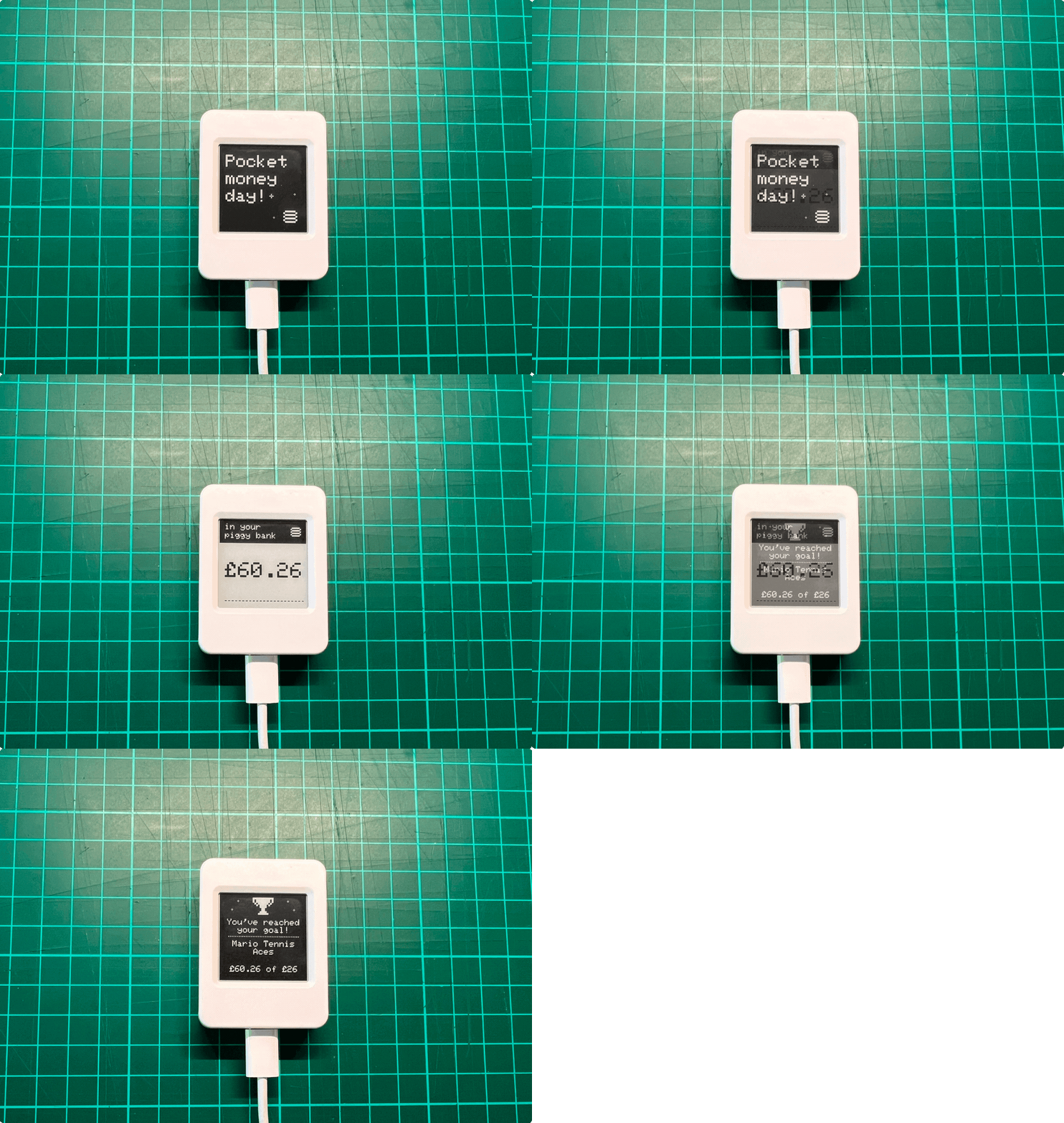
The boys can now check their own savings without asking me, which was the whole point. It’s a small thing, but their money has moved from my phone onto their shelf, and the Switch games feel a bit closer for being able to see them coming.
Update
A friend asked how he could get this up and running for his kids, so I created a guide and thought I’d share it here. Dump it into your coding agent of choice and let it cook.